AWS Security Blog
Improving SPIRE security and resiliency with AWS managed services
In cloud-centered environments, establishing trust between workloads is fundamental to securing machine-to-machine communication. Traditional approaches such as API keys, shared secrets, and static service account credentials weren’t designed for the scale and ephemeral nature of cloud workloads. This drives an organizational need to shift from long-term, static credentials to short-lived cryptographic workload identities. Organizations are turning to SPIFFE (Secure Production Identity Framework for Everyone) as a core component of their workload identity strategy. SPIFFE is a set of open source standards for securely identifying software systems in dynamic and heterogeneous environments. Using SPIFFE can help address what’s known as the bottom turtle problem: the circular dependency where protecting one credential requires yet another credential.
SPIRE (the SPIFFE Runtime Environment) is an open source implementation of SPIFFE. Customers can use it to quickly experiment with the framework. However, there are operational and security considerations when deploying SPIRE in production, such as:
- Where cryptographic signing keys for workload identities are managed
- How to ensure availability and resiliency of the workload identity registry
- How the SPIRE Certificate Authority integrates into the existing enterprise PKI
- How workloads without direct connectivity to the SPIRE server validate identities
- How workload identities are delivered to serverless environments
- How fine-grained authorization based on SPIFFE IDs is enforced
In this post, we show you how to address each of these considerations by offloading SPIRE core functionality to AWS managed services. This post is accompanied by a Github Repository that guides you through the deployment of the reference architecture.
To learn the core concepts the SPIFFE framework, take a moment to familiarize yourself with the SPIFFE documentation.
SPIRE background
A SPIRE deployment is comprised of at least one SPIRE Server, at least one SPIRE Agent, and at least one workload.
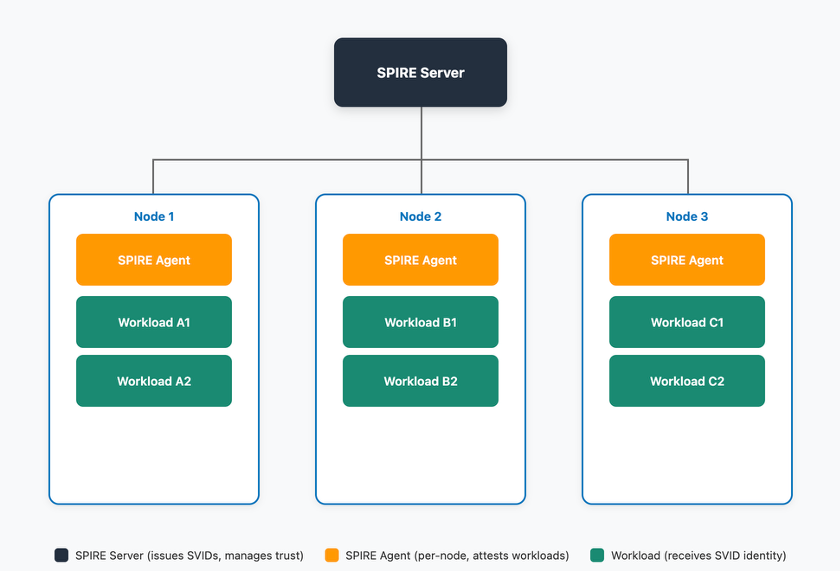
Figure 1: SPIRE high-level architecture
The SPIRE Server is deployed on a central control plane instance (or instances) and manages identity issuance and stores workload identity registrations. The SPIRE server handles five key functions:
- RegistrationAPI: Create, update, and delete registration entries that define which workloads are entitled to specific SPIFFE IDs based on selectors (for example, Kubernetes namespace, Unix UID).
- DataStore: The SPIRE server uses a data store to keep track of the workload identity registration entries and the status of the SVIDs it has issued.
- KeyManager: Controls how the server manages private keys used to sign X.509-SVIDs and JWT-SVIDs.
- BundlePublisher: Publishes the local trust bundle to a store. The trust bundle is an object containing a trust domain’s cryptographic keys
- UpstreamAuthority: Dictates which root certificate authority is used to sign the SPIRE certificate authority (CA) certificate
The SPIRE Agent is distributed across your workloads, whether they run on Amazon Elastic Compute Cloud (Amazon EC2) instances, Amazon Elastic Container Service (Amazon ECS) containers, or Amazon Elastic Kubernetes Service (Amazon EKS) Pods. The SPIRE Agent handles:
- WorkloadAPI: Exposes the workload API to workloads, which enable workloads to retrieve their SVIDs and trust bundles from the SPIRE server.
- NodeAttestation: SPIRE requires that each agent attest and verify itself.
- WorkloadAttestation: The SPIRE agent collects workload metadata to determine its identity.
- SVIDStore: The SPIRE Agent also stores SVIDs in other destinations, such as AWS Secrets Manager or HashiCorp Vault making them available for workloads running in serverless environments.
After the server and agent are deployed, applications retrieve short-lived SPIFFE Verifiable Identity Documents (X.509 Certificates or JSON Web Tokens (JWTs)) using the workload API.
How to use AWS managed services for core SPIRE functions
In the following sections, we dive deeper into what each of these SPIRE functions does and the advantages of using each AWS service for the function.
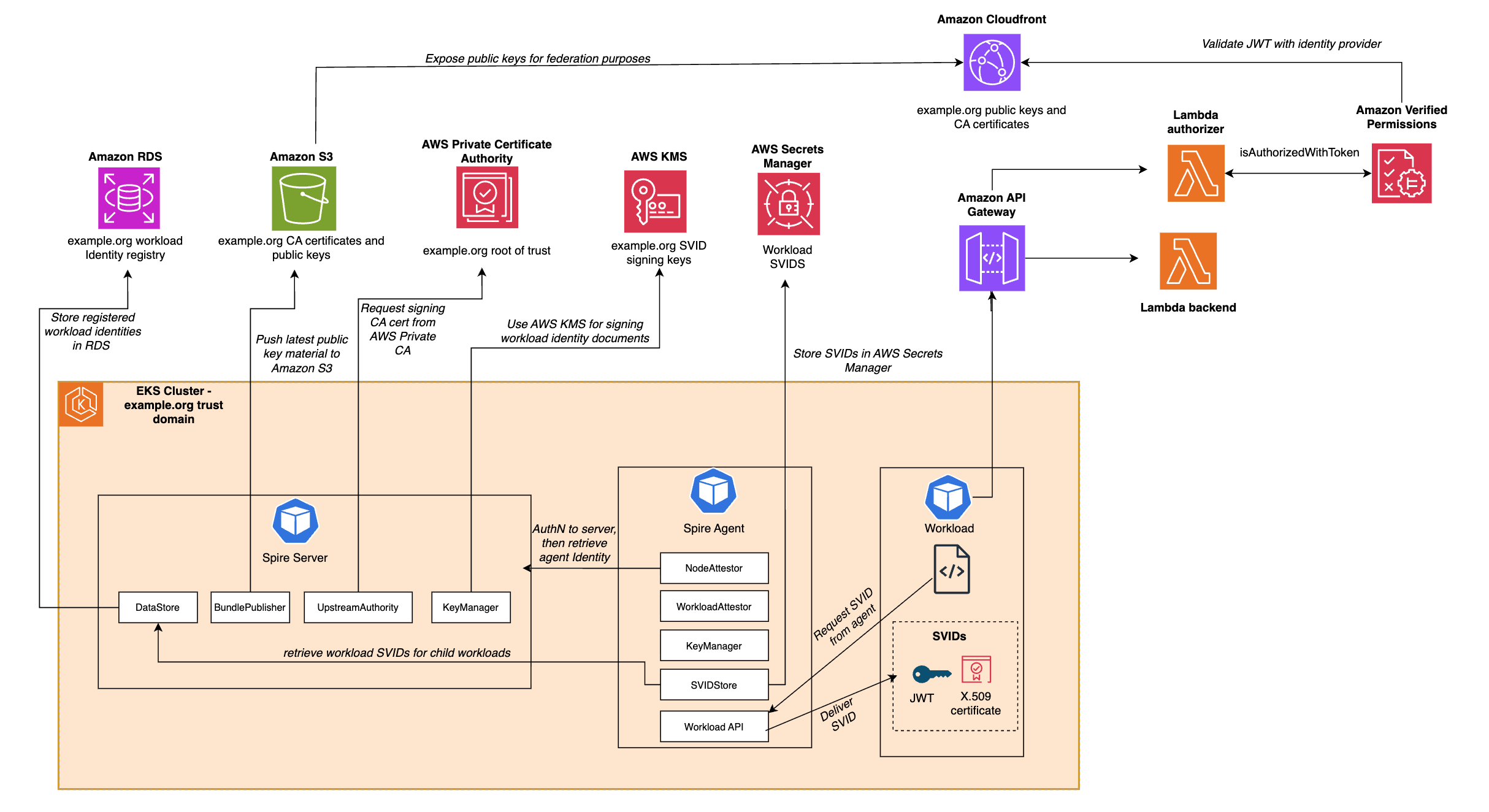
Figure 2: SPIFFE architecture using AWS managed services
To deploy the infrastructure required to follow along with this post, follow the deployment process in the Github Repository.
Note: For each managed service, there’s a parameter in the source AWS CloudFormation templates that you can use to specify whether to provision the resource. For example, if you already have an AWS Private Certificate Authority (AWS Private CA) certificate authority deployed in your environment, you can use that for your SPIRE implementation and avoid provisioning a new certificate authority.
SPIRE Key Manager using AWS KMS
The SPIRE Key Manager controls the cryptographic keys that are used to sign SPIFFE Verifiable Identity Documents (SVIDs), which are either X.509 certificates or JWTs.
By using SPIRE, you can configure the cryptographic keys to be either stored in memory or on disk, or to use a plugin where external keys are used for signing SVIDs.
By using the AWS KMS plugin for SPIRE, you bring the security benefits of AWS KMS to your SPIRE implementation.
- HSMs: AWS KMS uses hardware security modules (HSMs) that have been validated under FIPS 140-3 Level 2
- Key protection: Your plaintext AWS KMS keys don’t leave the HSMs, aren’t written to disk, and are only used in the volatile memory of the HSMs for the time needed to perform your requested cryptographic operation
- Comprehensive auditing: Each request to use the keys for signing must be authenticated using Signature Version 4 (SigV4) and is audited and logged in AWS CloudTrail
- Fine-grained access control: Use AWS KMS Key Policies to restrict access to your signing keys
This configuration block indicates to SPIRE that AWS KMS keys are used to sign our SVIDs:
This code block exists in the SPIRE server configuration deployed in the Github repository.
SPIRE datastore using Amazon Aurora
The SPIRE server uses a data store to keep track of the workload identity registration entries as well as the status of the SVIDs it has issued. By default, the datastore lives as an SQLite database in memory. However, you can configure the SPIRE server to use Amazon Aurora. By doing this, you can decouple the database from the server and offload the operational overhead of managing the datastore to AWS.
Benefits:
- High availability: Automatic failover and multi-Availability Zone deployments
- Automated backups: Point-in-time recovery and automated backup retention
- Scalability: Scale compute and storage independently
- Security: Encryption at rest and in transit, with AWS Identity and Access Management (IAM)
- Monitoring: Built-in performance insights and enhanced monitoring
- Reduced operational burden: Automated patching, maintenance, and updates
To do this, the CloudFormation stack provisions:
- An Aurora PostgreSQL Cluster
- A database user with the capability to authenticate through AWS IAM
- Network connectivity between your SPIRE Server and the database
After the sample finishes deployment, the configuration in the SPIRE server is changed from the default:
To:
For more information, see Datastore SQL Plugin.
SPIRE certificate authority using AWS Private Certificate Authority
The SPIRE Server issues SVIDs to SPIRE agents and workloads. Given that these SVIDs are X.509 certificates, the SPIRE server needs to act as a certificate authority. In the default configuration of SPIRE, the server generates a self-signed certificate that it will use as the root CA certificate. In production scenarios, organizations often use their existing AWS Private CA certificate authority hierarchy.
Using the AWS Private CA plugin for SPIRE, you configure the SPIRE CA to act as an issuing certificate authority that chains to your existing root CA. This delivers three benefits for your SPIRE implementation:
- HSM-backed root of trust: The root of trust of your CA hierarchy is backed by fully managed, FIPS 140-2 Level 3 validated hardware security modules
- Non-exportable private keys: The private keys for the root CA can’t be exported
- Fully Managed Certificate Revocation Lists and OCSP endpoint: In case the issuing CA certificate needs to be revoked
Note: If the SPIRE CA certificate will be signed by an issuing CA, you need to ensure that the path length of that CA is at least 1. The sample code provisions a root CA, so this isn’t an issue if you’re following the sample code.
After the sample deployment is complete, the configuration of the SPIRE server configuration includes the UpstreamAuthority plugin to use your AWS Private CA certificate authority as the root of trust.
For more information, see the AWS Private CA upstream authority plugin documentation.
SPIRE bundle publisher using Amazon S3
In SPIFFE, trust bundles are sets of public keys that are used by destination workloads to verify the identity of source workloads. These bundles contain the root certificates and public keys used to sign JWT SVIDs.
The SPIRE Server supports exposing an endpoint containing this trust bundle or publishing the bundle to Amazon Simple Storage Service (Amazon S3).
By publishing the bundle to Amazon S3, you can:
- Decouple: Decouple bundle access from the SPIRE server availability
- Continuous validation: Allow destination workloads to continually validate source workload identities without requiring network access to the SPIRE server
- Global distribution: Distribute the trust bundle using Amazon CloudFront, improving performance through the CloudFront global edge network with over 750 Points of Presence
- Reduced load: Offload trust bundle retrieval traffic from the SPIRE server
- Version control: Maintain historical versions of trust bundles with S3 versioning
The following is a sample configuration for this plugin:
For more information, see S3 Bundle Publisher Plugin Reference.
SPIRE Agent SVID store using Secrets Manager
In a typical SPIRE implementation, SVIDs are retrieved from the workload API using the SPIRE agent by workloads. In serverless or container cases, it isn’t feasible or possible to run the SPIRE agent, especially in workloads running on AWS Lambda or an AI agent running in Amazon Bedrock AgentCore Runtime. In these scenarios, use the SVID store plugin to push the SVID to Secrets Manager.
In this scenario, you still need a SPIRE agent running on a node that performs node attestation with the SPIRE server and delivers the SVID to a secrets store. One of the available secrets store plugins is the AWS Secrets Manager SVIDStore Plugin.
Benefits:
- Encryption at rest: Secrets are encrypted by default using AWS managed or customer-managed AWS KMS keys
- Broad integration: Integrations with multiple compute types, including AWS Secrets Manager Lambda Extension, Amazon ECS, Amazon EMR, and 52 other AWS services
- Client-side caching: Secrets Manager provides client-side caching libraries to improve performance and reduce API calls
- Multi-region replication: Built-in multi-Region replication functionality for workloads with multi-region requirements
- Fine-grained access control: Use resource policies to control which workloads access which SVIDs
- Audit trail: All secret access is logged in CloudTrail
This plugin is configured in the agent, as opposed to the SPIRE server. A reference for the specific permissions required are in the plugin Github repository. In the sample code, see the configuration in the following agent.conf file:
When you need to specify a given workload’s SVID to be pushed to Secrets Manager, you add the storeSVID and selector parameters when you create the entry in the workload registry. If you’re managing your SPIRE server in Kubernetes, the appropriate command looks like:
Fine-grained access control using Verified Permissions
Up to this point, all the managed services we’ve talked about have been used for creating and distributing SVIDs and trust bundles to workloads. However, a key advantage of using a framework such as SPIFFE is that it allows resource owners to protect resources with fine-grained access control. One managed service that helps you do that in the context of SPIFFE and SPIRE implementations is Amazon Verified Permissions.
Verified Permissions is a scalable, fine-grained permissions management and authorization service that helps you build secure applications. You can use it to:
- Define declarative policies: Use Cedar policy language, which provides human-readable, declarative access control rules
- Centralize policy management: Separate authorization logic from application code
- Take advantage of the straightforward policy authoring, formal verification capabilities, and performance benefits of Cedar
- Make real-time decisions: Evaluate authorization requests in real-time based on multiple factors including user identity, workload identity (SPIFFE ID), resource attributes, and contextual information
- Integrate with identity providers: Support for OpenID Connect (OIDC) providers, enabling validation of JWT tokens including JWT-SVIDs
With Verified Permissions, you authenticate SPIRE issued SVIDs using the public keys associated with your trust domain, and deploy fine-grained authorization policies protecting your resources. To use Verified Permissions, you need a policy store, an identity source, and authorization policies.
The github sample creates a policy store on your behalf and sets up the necessary infrastructure to have SPIRE serve as an identity source for your policy store.
You will need policies to enforce fine grained authorization. The following sample policy forbids a specific workload from taking any action:
Or conversely allows a specific workload to take actions:
Experiment with these policies as you build on top of your SPIRE infrastructure.
Conclusion
This post demonstrates how organizations enhance their SPIRE deployments on AWS by replacing default implementations with AWS managed services. We showed you integrations with AWS KMS for SVID signing, Amazon RDS Aurora for managed datastore operations, AWS Private Certificate Authority for root of trust, Amazon S3 and CloudFront for global trust bundle distribution, AWS Secrets Manager for SVID storage, and Amazon Verified Permissions for fine-grained authorization. By adopting these integrations, organizations can improve security posture, reduce operational complexity, and enhance resiliency.
If you’re interested in learning SPIFFE on AWS, check out our SPIRE on AWS github sample or the SPIFFE and SPIRE on AWS Workshop for hands-on learning.
If you have feedback about this post, submit comments in the Comments section below.